Search this site
70 results found with an empty search
- Popcorn & Chills: Our 2023 Horror movie selection
As the nights stretch out and leaves take on a reddish hue, it becomes the ideal moment to curl up under a blanket and delve into some spine-chilling tales. But which horror movie to see this week? Here's a small selection of films and series we recommend for you; some with terrifying stories, others supernatural, sometimes featuring creatures or are shrouded in dark mysteries. Time to pop some corn and dim the lights for our 2023 picks. The Fall of the House of Usher - Mike Flanagan Mike Flanagan, the director behind hits like The Haunting of Hill House and Midnight Mass (our personal favorite!), returns this October with an adaptation of Edgar Allan Poe's famed story, The Fall of The House of Usher. True to his style, Flanagan toys with horror conventions and dives deep into real terror: human nature and, in this instance, the lengths we go for money. Familiar faces from the Flanaverse deliver stellar performances, as always. If you're a fan of his style and crave more than just jump scares and gore, this series is a must-watch. No one will save you – Brian Duffield Loved by some, loathed by others, this film ends in a way you won't forget. No one will save you follows a young woman, Brynn, fighting to survive an alien onslaught. "Been there, done that", you might think. However, the director throws a curveball, delivering a roughly 90-minute film... without dialogue! The few words spoken are chosen with utmost care, prioritizing a wholly visual narrative and highlighting Kaitlyn Dever's impressive performance. While not outright scary, there are disturbing scenes, and the alien race introduced is both fascinating and curious. Talk to me - Danny and Michael Philippou The Philippou brothers, previously recognized mainly for their YouTube channel RackaRacka, have made a stellar debut with Talk to me, which, according to IMDB, is "on track to become the best horror film of the year". Shot in Australia, it was featured at Sundance, where it caught A24's attention. Transitioning from YouTube likes to film festivals, the brothers captivate with a refreshing, modern take on possession. Mobile phones, trends, challenges – they've included it all. With Mia as the protagonist, evoking memories of Euphoria's Rue, this thriller is as unpredictable as it is spine-chilling. Don't miss it this Halloween! Evil dead rising - Lee Cronin In today's world, franchise films are inevitable. Evil dead Rise is no exception, marking the fifth installment of The Evil Dead. The narrative unfolds around two sisters thrust into a nightmare as one becomes demon-possessed. While retaining the charm and iconic elements from the original movies (like the chainsaw), this version leans towards a graver, even more unsettling tone. Special shoutout to the lead actress and the remarkable makeup team for bringing to life a genuinely disturbing character. We also admired the polished visuals and meticulous cinematography. Svaha: The Sixth Finger - Jang Jae-hyun For fans intrigued by Asian horror cinema, Jang Jae-hyun's Svaha: The Sixth Finger is wroth your while. Beyond the typical scares, the movie delves into the complexities of religion, cults and deep-rooted Korean superstitions. It showcases Squid Game's lead actor, Lee Jung-jae, further proving his outstanding versatility. Jae-hyun, with his signature visual flair, weaves together the supernatural and spiritual, prompting reflections on faith. Malignant – James Wan Even though James Wan released The Nun II this october, we've chosen to spotlight Malignant. Despite mixed reviews and a lackluster box office, its boldness stands out. Wan offers a fresh horror perspective with a unique pace, story and concept that should be more talked about. His ability to challenge genre expectations further cements his undisputed talent in horror cinema. American Horror Story – Double Feature The American Horror Story franchise continues to surprise and innovate. While the latest season, Delicate, is currently running, we recommend checking out Double Feature. This season, split into two distinct parts, touches upon the Roswell alien conspiracy and a covert government agreement. Presented in black and white, with its always refined aesthetics, the first segment delves into a rarely discussed conspiracy theory. The latter segment uses vampires as a mere backdrop. The true horror revolves around creativity and the extents we'd go to be the best... Something that spoke to us, like on a personal level. Incantation - Kevin Ko Last on our list, Incantation is a Chinese film that navigates between folklore and the supernatural. Right from the start, you're thrust into a ritual; participation isn't optional. Using the found-footage format, the story unfolds around a young woman returning to her hometown, only to discover an ancient curse possibly responsible for her family's misfortunes. Blending unease with mysticism, the film toys with appearances and blurs the line between reality and myth.
- Fantastic creatures in ads
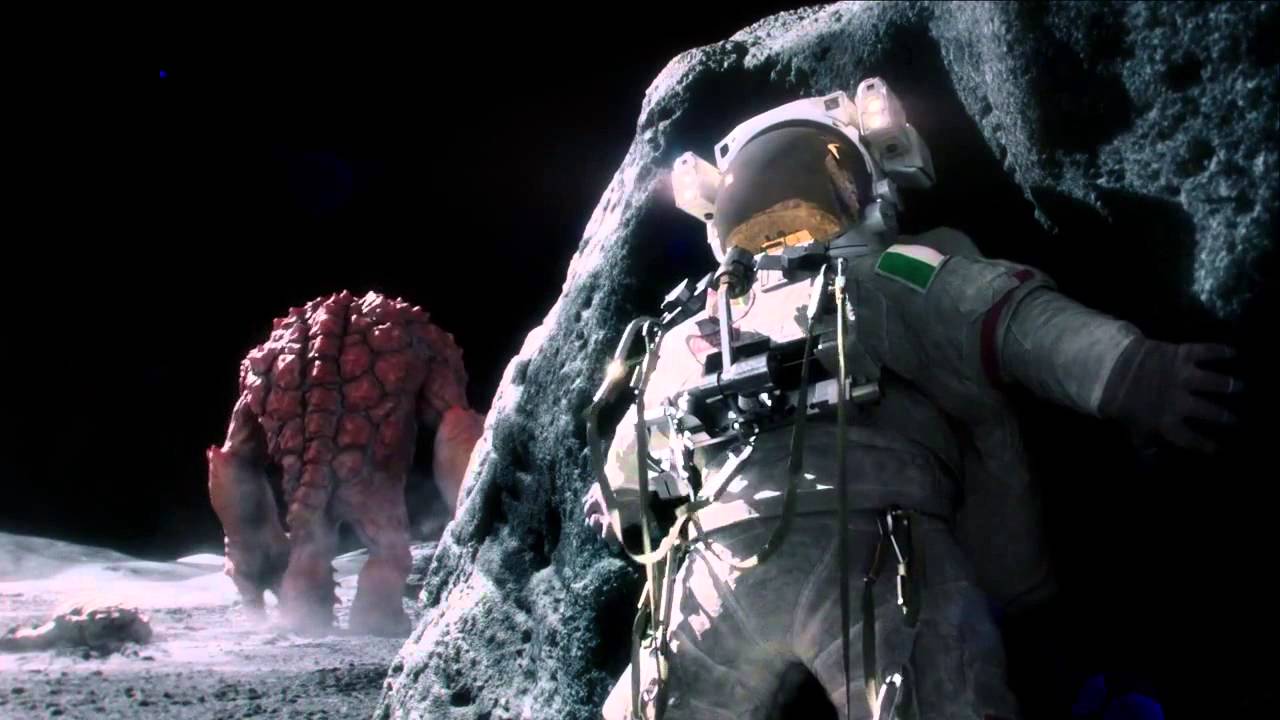
Cinema is not the only realm where fantastic tales unfold. Be it chilling horrors or mythical entities, the ad world too has a knack for leveraging these elements. To etch a lasting imprint, adding creatures can either accentuate a product's strengths, underline its limitations, or simply deliver a powerful visual punch. Here are six adverts, both from yesteryears and contemporary times, that have used CGI and VFX to incorporate fantasy entities, presenting a narrative with a distinctive twist. As you know, the realm of creature creation is vast; should you wish to infuse one into your campaigns, we're here to breathe some life into it! Haynes Baked Beans – not for astronauts This advert is from a few years ago already. Deviating from the expected, it portrays astronauts triumphant in their moon landing, only to be haunted by an alien monster. One astronaut narrowly evades the threat, but only momentarily. While this is essentially a fictitious advertisement for a bean product, it holds a place on our list because it was created as a promotional piece for Cinesite, the CGI company responsible for its production. After all, isn't promotion itself a form of advertising? Given the success it had, maybe a brand should think about doing something like this. Chek out the behind-the-scenes! Burberry - Night creatures Last year, the luxury brand made an ad that became iconic, where aerial dancers glided above wheat fields. This year, Burverry unfurled a sequel. While the central theme remains unaltered, the fresh twist debuted what seems to be a technologically advanced alien, that dances with the humans. It wouldn’t be amiss to suggest that the creature's design took cues from the extraterrestrials in "War of the Worlds." Volkswagen Electrifying Movies: Monster Escape "Don’t’ worry, she can’t escape the electric fence”, says the guardian of the park, only for another to disable said barrier to charge his car. Drawing inspiration from Jurassic Park, Volkswagen cleverly meshes its endorsement for ITV—a British TV network—to showcase its electric vehicle in a whimsical, fantastical setting, all while maintaining a humorous undertone. Canal Kitchen In an ad promoting TV channels, it's only fitting to use and explore the myriad universes they span! Ranging from dinosaurs and sports to animated characters, this advert underscores the vast bouquet of entertainment options available, akin to a chef parading his culinary masterpieces. T-shirts Taking Flight? Absolutely. IKEA reaffirms its creative audacity, rolling out campaigns of varied moods to tout its offerings—each echoing the brand's commitment to space efficiency and storage solutions. In this particular narrative, the spotlight isn't on... let's say known fabled creatures. It's on T-shirts. Yes, you read that correctly. Tees that migrate, just like birds would. Mikado. So, who's the clever one? In this ad, a reimagined Godzilla induces chaos. However, the giant reptile meets its match, facing electrocution when it emulates a young woman savoring a Mikado. This straightforward yet impactful concept astutely accentuates the brand's catchphrase.
- What happens if the director is a CGI artist?
Across diverse visual mediums—be it films, ads or music videos— visual effects have firmly anchored themselves as an integral element of storytelling. Yet, a lack of understanding about this intricate art often results in films that miss the mark, as witnessed in movies like "Cats" and more recently… "The Flash". However, every so often, a film emerges that stands as a testament to the power of seamlessly integrating VFX into storytelling. Such is the case with "The Creator" by Gareth Edwards. Gareth’s unorthodox approach to making “The Creator” Before gracing the director's chair, Gareth Edwards was a visual effects artist, as he mentioned in an interview with The A.V: “I spent 10 years doing computer graphics very cheaply in my bedroom. So, I learned a lot of tricks as to how to make things look bigger than they are with very little effort”. With this background and unique insight into CGI, he became a director known for helming epic-scale movies like "Godzilla" and "Rogue One", with great visual effects. But back to “The Creator”. The first thing that is astounding about this sci-fi epic is its budget. Edwards transformed the normally $300 million projected budget for these kinds of movies, into an $80 million spectacle rivaling any other blockbusters. How? Well, they changed the approach: “obviously, we went for ‘Go make it like an indie movie, but on steroids,’”, he said to Inverse. He leveraged 80 real-world locations instead of sets and worked with a remarkably intimate camera crew, guerrilla style. But that’s not all… Rather than follow the traditional path of shooting a film and then letting VFX companies bid for post-production, Edwards intertwined the VFX team into the filming process from the outset. This approach not only streamlined post-production but also optimized the budget. Further breaking the mold, the film was edited to its final version first, and only then handed over to the VFX teams, which allowed the artists to concentrate solely on the shots that were going to be used; perfecting what needed to be perfected. Drawing parallels, Sam Hargrave, the director of "Extraction", brought a similar depth of specialized knowledge. Having been a stunt coordinator for movies like "John Wick", Hargrave's intimate understanding of action sequences resulted in "Extraction" being celebrated for its raw and riveting action choreography. Just as Edwards' understanding of VFX enriched "The Creator", Hargrave's background ensured "Extraction" was both authentic and breathtaking in its depiction of action, bridging the gap between stunts and storytelling. So, movies that heavily rely on CGI aren't just about having astronomical budgets that result in poor visual effects. If thought from a different point of view, amazing things can be done. Iit is not just about the adoption (and abuse) of these technologies, but about understanding what they have to offer and their limitations, in order to integrate them organically into storytelling. Gareth Edwards is a great example of this, challenging the way big studios work with VFX companies, he showcased, yet again, that CGI when understood deeply and used judiciously, makes the movie magic.
- Did you know that one of the first pioneers of cinema was a woman?
Her name was Alice Guy. She was a visionary artist, a pioneer of early cinema who helped shape the art form as we know it today. Born in the Parisian suburb of Saint-Mandé in 1873, Guy has left an incredible legacy for filmmakers. Unfortunately, her name remained largely unrecognized for years and most of her films were lost. Here are a few reasons why she should be recognized and remembered. Scripting the Silver Screen In an era where motion pictures were still in its infancy, primarily used to capture moving objects like a speeding train, a horse running or a passing parade, Guy saw an opportunity to use the medium differently. She was inspired to tell "little stories that [she] would make up", thereby revolutionizing the film industry. It was 1896 – just a year after Les frères Lumière invented the Cinématographe –, when Guy made history with her film "La Fée aux Choux" (The Cabbage Fairy). The one-minute short tells the story of a fairy who creates babies out of cabbages and is widely recognized as one of the earliest examples of narrative filmmaking. However, the original version of the film is lost. The versions available today are from 1900 and 1902. The Palette of Illusions: Alice's strides in early visual effects Lately, people seem to say that movies back in the days were better, without the overuse of visual effects. Well… contrary to popular belief, visual effects have been part of the magic of cinema since its genesis, and Alice Guy was a pioneering force behind this. For example, she was among the first filmmakers to add hand-tinted color to her films, a groundbreaking technique for its time. Additionally, she experimented with double exposure, most notably in " The Birth, the Life and the Death of Christ" (1906), which could be considered the first-ever super-production, with over 300 extras and 25 sets, and a running time of 33 minutes. In the film, she used this technique in many occasions to create supernatural events, such as the ascension scene. In addition to that, she was the first to use Close-up shots, which later became a hallmark of modern cinema, and also explored synchronized sound through the Gaumont Chronophone, showing an innovative grasp of technology, introducing sound effects and music into her films as early as 1902. A prolific filmmaker! Throughout her career, which spanned from 1894 to 1922, she is estimated to have directed, produced, or supervised approximately 600 silent films and 150 synchronized sound films. These films encompassed a broad spectrum of genres, including comedies, dramas, historical epics, adventure, westerns and even tackled some political and more delicate subjects, such as race and genre. One example is "Les résultats du féminisme". Released in 1906, the film challenges traditional gender roles and highlights the absurdity of societal expectations surrounding gender, with a message that still resonates over a century later. According to Woman film pioneers project, Guy also made numerous action films with female characters as heroes, where she’d cast and train women to do their own stunts. Other example of her rebellious spirit is “A fool and his Money”, considered to be probably the first film to have an all-African-American cast. The film is now preserved at the National Center for Film and Video Preservation at the American Film Institute due to its historical and aesthetic significance.
- Top 6 Halloween ads
As summer reaches its zenith, the countdown to the eeriest, most bewitching night of the year begins! And, we must confess, it is our favorite season. So, of course, we are getting ready for it, because with just 100 days left until Halloween, it’s the perfect moment to start preparing some creative ideas to unleash the most innovative, spine-chilling and impactful videos for social media or TV. Drawing inspiration from various sources – from classical movies and legendary monsters to horror tropes – Halloween is a fun and different playground for businesses. Whether it’s about shoes, food, architecture or toilet paper, it’s the perfect moment to sell a product with a (bloody) twist. Not sure how you can use it? Here are our top 6 Halloween ads that show how you can subvert the horror themes to your advantage in a playful, but scary way: Burger King #nevertrustaclown: As always, Burger King never misses an opportunity to showcase its creativity, particularly when it comes to mocking its longtime rival, McDonald's. In this ad, they not only utilize McDonald's mascot, Ronald, but also tap into a common fear—sometimes even a phobia—the fear of clowns. Because, let’s be real… who doesn't find clowns creepy? IKEA – The Shining: We've all wandered through the long hallways of Ikea, with its meticulously designed spaces showcasing a plethora of products. These corridors, when empty, evoke an eerie vibe, that now that we think about has similarities with the 'backrooms’, don’t you think? Anyway, in this case, the multinational drew inspiration from the beloved horror classic, The Shining, recreating the notorious corridor scene where young Danny rides around on his tricycle, ultimately coming face to face with the ghostly twins. Bacardi – The Zombie: Here's another captivating approach to Halloween season marketing. It's straightforward, poignant and effective. Bacardi crafted a seasonal special, a cocktail named 'The Zombie'. To introduce this concoction to their clientele, they probably drew inspiration from the opening credits of American Horror Story. Embracing a chilling VHS aesthetic and eerie audio, they reveal the various ingredients needed to whip up your choice of cocktail for the season Dior – The beauty of a dark dream: Halloween isn't just for the ghouls and goblins; it's also a time for luxury brands. With a video shared on their Instagram account, Dior showcased their make-up products with a different approach: a tip of the hat to the 1920’s German expressionism from iconic films like Nosferatu and The Cabinet of Dr. Caligari. Through stark shapes, reminiscent of brutalist architecture, dramatic shadows, lighting and make-up, they recreated a spooky atmosphere without straying from their innate elegance and sophistication. Dirt Devil - The Exorcist: Now, if you're a bit more daring and want to try something more shocking, this ad is for you! This advertisement, which plays out like a short film, recreates the exceedingly creepy vibe of one of the most frightening movies of its time: The Exorcist. With screams, eerie violins, a priest and an apparent possession, this ad uses dark humor to sell... well, vacuum cleaners. Definitely worth watching! Tempations – Tasty humans: this short ad plays off the age-old association of cats with the underworld, witchcraft and, by extension, Halloween. A cat owner, afraid of what his pet could do to hm during the night, invites viewers to stay safe by treating their felines to the special edition "human-flavored" treats. It's a fun, highly effective concept that perfectly fits the season. Bonus entry! BMW – don’t be afraid: Although this is not a Halloween ad per se, it is another example of how you can use horror tropes for your different messages. In this case, BMW was testing their autonomous driving cars, which seem scary, even for the spirit it encounters in the woods. These successful campaigns showcase how creativity can be unleashed when Halloween meets marketing. But this doesn't mean you have to do it all on your own. As true aficionados of horror movies and its tropes, we thrive on the art of crafting videos that perfectly capture the chilling vibe of the season (check out our spooky reel!). After all, the most haunting day of the year is fast approaching, so now is the perfect moment to brainstorm some ideas.
- We tested various AI video generators, so you don’t have to!
Venturing into the world of AI-powered video generators can be quite the labyrinth, filled with promises of innovation and efficiency. However, it's not always easy to find the right tool that suits your unique needs – and this goes for any generative AI. So, we dug a little, and tested various video genereators. Now, bear in mind that we were looking for creative AI video generators, so any corporate video generators – like Synthesia –, are out of this list. Now, without further ado, let's dive into the five picks of the moment. Runway This is, for the moment, the most useful tool for a filmmaker. It has many “magic AI tools”, but we are going to talk only about Gen-1 and Gen-2. Gen-1 lets you upload your video and apply any desired style to it. This can be achieved by uploading an image that encapsulates the specific aesthetic you're aiming for, but do make sure this image has some similarity to the composition of your video (if not, you'll have a monstrosity!). Alternatively, you could use one of the tool's presets (metal, cloudscape, etc.), or describe the style you’re looking for through a prompt. Gen-2 is a text-to-video generator. The process is straightforward: write your prompt (for instance, "astronaut in an alien jungle") and wait for the results. Now, it’s still in its baby steps and lacks the ability to create John Wick kind of action scenes. Ok, we'll be honest... even the execution of simple action can prove challenging, but it does have this weird AI-looking vibe that provides an opportunity to play with. Why we like it? It has a video-feel to it, it’s somewhat fluid, does not flicker and is easy to use. The downside? The price. It is $15/month (standard), which gives you 625 monthly credits. Each generation costs, so it’s not the most affordable tool when it comes to iteration: 1 second of Gen-1 generation = 14 credits ($.14) 1 second of Gen-2 generation = 5 credits ($.05) Ebsynth This an incredible tool, the full potential of which we've yet to exhaust, but we are already amazed by the results. Available for free download, Ebsynth operates on a principle somewhat akin to Gen-1, but it’s a little bit more difficult to use. Their concept is that you can “transform a video by painting over a single frame”. Well, it’s more over a few keyframes, but if you do your work properly, you’ll have neat results. This approach is ideal for filmmakers keen on collaborating with a specific artist and vice versa. How does it work? First, you need to convert your video into an image sequence and generate an alpha channel. Next, select keyframes for the artist to meticulously paint over. The final stage involves rendering your creation through the tool. Why we like it? It is very faithful to the video and the artist’s style. It is free. The downside? You must have the final outcome in mind when filming, because it does not generate “new” things over your video. For example, you film a pirate but forgot the hat…, well Ebsynth won’t let you add it, even if you paint it. For this test, we changed the style of one keyframe with Stable Diffusion (as we're not that kind of artist) and then rendered it through Ebsynth. Kaiber Kaiber is a tool “made for artists, by artists”. This video generator has an user-friendly interface. It offers multiple options: one can input a prompt, upload an image to be transformed into a video, or even alter the style of an existing video. It also provides a range of adjustable parameters such as aspect ratio, camera movement types and a variety of preset styles. It makes some cool stuff, but personally, it is not the AI that we preferred. Why we like it? It is fun and easy to use. The downside? Inconsistencies in output and noticeable flickering between each image. In our testing, the most successful results were achieved when we uploaded a video and applied a distinct style to it (see below). Starting price: $5 / month for 300 credits. Test made using an input video and rendering through Kaiber Deforum You've probably encountered countless videos created with this tool on TikTok, as it rode the wave of a trend on the platform, but it’s a headache (at least for us). First and foremost, this is an extension of Stable Diffusion. Deforum can be used to create animation videos by providing the prompts and settings for how the camera moves. It uses Stable Diffusion's image-to-image function to generate a series of images and stitches them together to create a video. This tool is free, and you can run it on various platforms such as Google Colab, Windows, and Mac. Depending on the platform you are using, the installation process may vary. However, it isn’t the most user-friendly tool and you need to have a lot of patience with it. There are many settings you can play with (or get lost with), you need to learn how to write a Deforum prompt (which is not a simple sentence – it has its science) and a high-performance computer for smooth operation. Why we like it? It's free, with outcomes that can surprise you. You can also use a video or image as a base. The downside? A complicated tool with many things you have to figure out. Lot of flickering. Promo for Infidelitas, made with Deforum Zeroscope This text-to-video AI tool is available for everyone to use! It is a "Modelscope-based video model optimized for producing high-quality 16:9 compositions and a smooth video output". It is totally free and you can try to prompt some of your ideas! Mind you, it takes time to render (sometimes it is even saturated - like ChatGPT at the beginning) and it's not super high quality – as promised -, but it is a promising tool! Why we like it? A useful and fun tool to try out a video generator. The downside? If used as a free tool, it can be very slow. It is difficult to render a consistent idea, as you cannot put a “seed”. Test made using similar prompts to the ones used with Gen-2 For those who have stayed with us this far into the article, here's a pro-tip: If your goal is to create an AI video or incorporate AI elements into your videos, we strongly recommend experimenting with various tools. Find the one that aligns with your needs. Consider blending different tools for better results. Some creators have repurposed D-iD, originally designed for corporate videos, into a tool for crafting fictional short stories (we teted it too!). Most of the tools have a free trial… our advice? Try them all. You’ll quickly see which one fits best.
- Bringing nightmares to life with AI
The other day, Joe had the strangest dream; he found himself in an elevator, and when the doors opened, he was met with an odd trio: a nun flanked by two doctors. The imagery was unsettling, to say the least. Naturally, we decided to recreate this bizarre scene. Here's how we turned it into a "talking head"- an AI generated video. Follow us on TikTok for this kind of content (@orbitae_films) First, Joe took to paper and drew a schematic of his dream's scene. Then, Alex used Midjourney to breathe life into the sketch. How to do that, you may ask. Well, you have to upload your drawing to the Discord chat – this will give you a link. Use this link in your prompt and add the description of what you imagine. Remember to be as clear as possible, be specific with the style, lighting and aspect ratio. Ad minima. Pro Tip: Include specific details in your drawings. Below, you can see how the AI incorporated the yellow cross from our original sketch into the generated images, although it didn't quite capture that the other characters were doctors. From initial sketch to first image attempts, and then to coherent, realistic elements. The initial images Midjourney produced were nothing short of uncanny, teetering between the original sketch an a disturbing realism. So, what then? Well, you iterate, iterate… and what? Yes, iterate again. This is an often-overlooked aspect of AI tools; they require patience, time, and an incredible ability to live with frustration. But anyway, the key is to keep modifying and refining your prompts as you go, until the output looks like what you wanted. Once the image was fine-tuned, we wanted our nun to say something creepy. So, we turned to ChatGPT, to craft a compelling short monologue about AI becoming the new omnipotent God – idea the AI really liked, by the way. After some back-and-forth with the tool, we then edited and perfected the text on our side, until it was ready for the next stage. This is where D-ID comes into play. This software tool, mostly used for creating corporate videos and the like, uses AI to generate high-quality, realistic human avatars that talk (the lip-sync is pretty accurate, they even move their hands, head and blink!). But we did not want to do that. We wanted to challenge the tool. Unsurprisingly, it wasn't easy to find a more nuanced and creepy voice for our nun... But after hearing each and every one of them in all of their styles, we found one! Then we were ready: the image was uploaded, the script written and the voice selected. Time to click “generate”. In mere minutes, our nun was now inviting us to join a new AI-cult. A dash of atmospheric music for the vibe and voilà — the product of our AI-aided labor was complete. In the end, within a day, we were able to bring Joe’s nightmare to life, thanks to sketches, patience, AI and a somewhat bizarre imagination. Pro tip #2: Given its intended audience, D-ID primarily features corporate-sounding voices, some of which can be quite AI-y. If you’re looking to make a more creative piece, you have two options. As D-ID also lets you upload a specific voice, you can either use Eleven Labs (see zombie test), a voice generator tool that creates incredibly realistic voices, or record yourself, an actor, or a friend reciting the script (see fortune teller test). Zombie test: As we are closer to the face, the tool could make better, more realistic lip-sync. Fortune teller test: As she has a veil and a crown, you can definetely see where the AI cut the image. So, this would be something to avoid.
- An AI tool that integrates CG characters into live-action
We recently had the privilege of being beta testers for Wonder Dynamics' "Wonder Studio". Wonder Dynamics is an AI tool that integrates CG characters in real-life videos! This platform is an #AI powered tool that automates the #VFX workflow of animating, lighting and composing CG characters into your live-action scenes. Seems too good to be true? We thought so too. We've seen many AI platforms that offered the moon and... well, they fell short. But we were very surprised, to say the least, to see how it works, even in its beta version! Here's our experience and some insights into the platform's performance and most anticipated features. In order to test it, we created a short video featuring a quirky robot, called Beat-bot, exploring La Tour-de-Peilz, a small Swiss town. The project included 2,328 frames, 10 scenes, took approximately 8 hours to process and was filmed with an Iphone. The video has no post-process, all the results are directly from the platform. We just filmed, added a song, some sounds and our robot's voice (also made with AI, but that's another story). Without futher ado, here are some of the most anticipated features that "Wonder Studio" includes: AI Character motion capture and 3D Camera Tracking: Streamlining the process of obtaining motion data for seamless integration of digital assets. Clean Plates: Automated generation of clean plates, saving time and effort for VFX artists. 3D Character Pass: Providing a 3D character pass for easy compositing and scene integration. Alpha masks: Automatic creation of alpha masks for smooth and efficient layering. Complete scene in Blender: Offering the ability to export the entire scene into Blender for further editing and rendering. For our test, for which we used a robot-avatar that was already included with the platform, we observed the following areas that could use improvement (some of them are already accounted for by Wonder Studios): Image consistency: There were issues with the clean plates, resulting in some blurry images. Motion capture: Drifting was observed, especially in the robot's feet. Occlusion: The platform struggled to achieve convincing occlusion. Render artifacts: There were color artifacts in the final render. Contact estimation: Difficulties were encountered with accurately estimating contact points between the robot and the environment Overall, considering this is the beta version, we can definitely say that it is amazing what it can achieve. The amount of time VFX artists will save using this platform is game-changing! In conclusion, for us, having worked with VFX and animation since forever, what really caught our attention - in addition to the whole CG character animation and rendering - is that the platform delivers usable outputs, that you can correct or perfect if needed in your program of choice for your ad, short or film. Made by people who know the art, for people who do the art (seriously, check it out, even Steven Spielberg is on the advisory board). We will continue to make some tests. Next time, we will try the facial motion capture and we'll share it with you. Stay tuned and follow for more info about the VFX industry! #betaTest #WonderStudio #automation #innovation #WonderDynamics #Switzerland
- Exploring Luma AI: Recreating 3D Worlds with a Smartphone
Luma AI, developed by Luma Labs, is a cutting-edge technology that focuses on creating realistic 3D images from both photographs and video with “unmatched photorealism, reflections, and details”, as described in their website. Luma AI: Our final render, with added elements for ambiance. This technology aims to revolutionize the future of visual effects and make it accessible to everyone. Luma AI offers an iOS app that allows users to capture products, objects, landscapes and scenes using just an iPhone 11 or newer, without the need for Lidar or any specialized equipment. Luma AI has also introduced an Unreal Engine alpha that features fully volumetric Luma NeRFs running in real-time in UE 5, allowing for incredible cinematic shots and experiences. So, we definitely had to try it! We recently experimented with this technology to recreate a parking lot using just a video filmed with an iPhone. The results left us nothing short of amazed. Due to our imprecise filming, the software gave a dreamy, otherworldly feel to the final scene, which turned out to be an unexpected yet enchanting outcome for us. Luma AI: NeRF video output To further enhance the scene, we incorporated additional elements such as ambient lighting, garbage, chains, and other items to give it a more immersive and realistic feel. Finally, we gave it a Michael Myers-esque vibe, by putting our astronaut character lurking in the dark, because… well why not? As creators who frequently work with 3D environments, we are already stoked about how Luma AI can positively impact our work processes and projects. The software's ability to transform 2D images into detailed (and potentially surreal) 3D spaces opens up a myriad of possibilities for us to explore. The ease of use and accessibility of the technology make it an invaluable tool for artists, filmmakers and designers alike. The time and resources saved through using Luma AI can be redirected towards perfecting other aspects of a project, making the creative process more efficient and enjoyable. Although it is already incredible what Luma AI can achieve, it is important to remember that it is still a tool in development. Here are a few of the downsides we found: First, the geometry requires an extensive cleanup process in order to be usable. Additionally, the textures are low-resolution, which results in a blurry effect. If you're looking for a hyper-realistic result, it's not yet production-ready for #VFX applications or visualizations. However, you can still find creative ways to use the outcome! In our case, we harnessed the ethereal aspect we ended up with to create an atmospheric scene. Needless to say, that we already have some ideas in the works that will make good use of this tool. If you've read this far, don't forget to subscribe to our Newsletter and never miss a thing!
- Pandora's last fight
It looked like the coin moved in slow motion. Sarah was holding her breath. Her life depended on it. Both her eyes and her opponents were glued to this obtuse decelerated two-sided piece of metal. One flip. Two flips… even three flips in the air, until it finally began to fall down. Sarah was ready. She had never lost at this game. As it touched the ground, the coin hesitated a bit, but then it fell flat with a deafening sound, like a bell from hell. Heads. “Well, this will be interesting”, she thought. Generated with Midjourney She gazed at her opponent, who had already taken his gun out and was pointing it directly at her. But she was faster. In a split second, she backflipped and avoided the bullet by a mere millimeter. She felt the heat graze her cheek, leaving an itchy sensation. At the same time, she pulled out her weapon of choice for today’s battle. Not a gun. “Where’s the fun with that?”, she used to say, “one hit and you’re done!”. No, hers was a tad more dramatic. Personal. It was a Sica. A short sword bended at the end in an angle for maximum damage. It was used by the best warriors that ever existed: the gladiators. And that is exactly what she was. A gladiatrix. Like in the old days, if you participated at these games, your life was at stake but if you won, you won big. And Sarah knew how to fight. Her somewhat frail but tattooed body was deceiving. She was actually very agile, slithering across the arena, playing and haunting her pray like a cobra. Her strength came from deep within her bowels. At first, most of her opponents underestimated her, but it took her just a few fights in the ring to build a name for herself and instill fear. She was baptized Pandora, as she always brought doom to every person who dared challenging her. She ended her backflip in a theatrical pose: crouching with one leg stretched to the right, the Sica parallel to it, like a samurai. Six-shot - her opponent’s name - got a bit concerned. He never missed a shot. Although he had the upper hand winning the first move, she just ditched the shot and was now teasing him. Quietly observing him. Analyzing him, before launching her next attack. He imperceptibly pulled the hammer of his revolver and aimed. It was a clean shot or at least he thought. As soon as Sarah, AKA Pandora, heard the rattling of the gun, she threw a small dagger he had not seen, right into his predominant wrist, disabling his hand. The revolver fell heavily to the floor, with a splash of dirt and blood. At the same time, the shot missed Sarah yet again, but it hit a person in the audience. It passed through his beer, directly into his left nostril and exploded his brain. It was, indeed, a perfect shot. The people around him were covered with grey matter, though it did not bother them, some kept eating their hot dog, while a woman celebrated as she had found the bullet, displaying it high in the air, as if it were a baseball. The camera picked the action and showed it in the gigantic screens that surrounded the arena. The crowd was euphoric. It was the danger of coming to the games. Even if you were not in the arena, you could still get hurt by a redirected, avoided or thrown piece of armory. Accidents did happen. In fact, rare were the games with zero casualties. But it was part of the excitement, almost like being part of the fight itself. A Russian roulette. Just a few seconds later, a robotic stretcher arrived. It lifted the body with its metallic arm and proceeded to take it out of the stadium. Behind it, a mechanical table offered the splattered fans some beers. Simultaneously, the incident was put on replay on the big screens on each corner of the stadium, with a “WASTED” tag over it and a “#22”. The better and more unexpected your death as a spectator was, the higher the rank, which meant you went down for posterity. The top 10 of each year’s best deaths, being the most watched videos of the internet. Unfortunately for this reckless soul, he did not even make it to the Top 20. In the arena, Sarah was focused. Six-shot growled as he took the blade out of his wrist, tearing muscle, tendons and bones. The little dagger was modified by Pandora herself: it had inverted indentations, like tiny snake’s fangs. He looked at her with such anger, the blood vessels in his eyes popped, transforming them in two grotesque rubies. She grinned. Blinded with rage, he recklessly ran towards her, brandishing his second weapon of choice, a machete. The audience gasped. That move was a mistake. You could not just confront Pandora like that. The stadium went silent, waiting for what was inevitably going to happen. As he was approaching her, Pandora calmly got up and dodged the grotesque blade charging at her with a swift step to the side and rolled on Six-shot’s back. She then thrusted her Sica right between his lower back ribs with such force, it seemed his flesh was butter. With the help of her body weight, she slid the metal to his spinal cord, turned it and finally took it out, in a majestic movement. The loud snap that followed echoed in everyone’s head, making their toes curl. Generated with Midjourney Six-shot’s back bended like a branch as he fell to the ground. The crowd burst with joy. That was the reason it came here tonight. It was an unprecedented moment, an epic culmination. Pandora lifted her arms and claimed her victory. She had just made history: it was her 100th win in a row. She was a goddess. Invincible. The fight was clean, quick, almost too easy, she thought as she smiled to the audience, her arms still in the air. But it will be remembered. She will be remembered. “Pandora, Pandora”, chanted the crowd. She took in all the energy from the place. The sound of the crowd, the smell of blood, the taste of sweat. The deed, as predictable, was broadcast worldwide, even across colonies in different planets. She did become a legend. As soon as Sarah stepped out of the stadium, a heavy bag with her prize on her shoulder, she looked back at the place that had been her home for so many years and smiled. She then left, to never come back. It was the last time she was ever seen. ___ Alex Iwanoff